Source code GitHub
Introduction
When we design VPC according to the best practices, all resources like EC2 instances or Lambda Functions that don't require public access should be put to private subnets. Sometimes they could require access to the Internet, for example, for integration with external services, and it is where we need to implement a NAT (Network Address Translation) solution. In AWS, NAT could be implemented using NAT gateways or NAT instances. NAT Gateway is the recommended, convenient managed service that eliminates manual work.
On the other hand, NAT Gateway is quite expensive, especially for development and testing environments that do not require permanent outbound access 24/7. For example, NAT Gateway in the eu-central-1 region costs approximately $37 per month per 1 AZ plus cost for data processed, that gives more than $70 per month even with low traffic. In addition, a NAT Gateway resource costs money even when idle, and this quickly adds up across regions and accounts.
In this post we discuss how to reduce cost for Dev or other non-critical environments by removing NAT Gateways and stopping EC2 instances and restoring it back using AWS System Manager Automation.
Task
Let’s formulate the task: to reduce cost of non-critical environments by disabling outbound Internet access when it is not needed, while keeping infrastructure consistent with IaC and avoiding manual changes.
Possible Approaches
There are several ways to address this problem. First, you should review the environment to make sure outbound Internet access via NAT is indeed required and consider other infrastructure designs. For example, if outbound access is added to provide access to public AWS services like S3, adding VPC endpoints is an alternative design.
For non-critical environments with low traffic where high availability is not a strict requirement, you may use a single NAT Gateway for subnets in several Availability Zones. Despite this approach reduces NAT hourly rates, it has the following disadvantages:
- Single NAT Gateway is charged even if it is idle.
- Traffic between AZs increases latency.
- Traffic between AZs introduces inter-AZ data transfer charges.
- Adds single point of failure - any issues with routing in the public subnet where NAT Gateway is deployed blocks Internet access for all private subnets.
Further, most development teams use IaC tools that allow control and automate infrastructure deployments. Metadata of resources deployed by IaC tool are kept in the tool state, so deployment could be broken if resources are removed and recreated manually. A close approach is to introduce a Boolean variable and create a NAT Gateway depending on the value of the variable.
It helps to set up CI/CD pipelines with different settings that at morning updates the environment, creates NAT Gateways and starts EC2 instances, and in the evening removes NAT Gateways and stops EC2 instances. From my personal experience, such an approach adds extra complexity, as it's difficult to set an optimal time for such pipelines and is hard to understand and manage. But it still can be a good option if the team needs to remove or shut down many resources for the deployments.
To simplify deployments, IaC tools may deploy NAT Gateways for environments where they are permanently used and exclude NAT Gateways from the deployments to non-critical environments. In this case, engineers may create CLI scripts to manually create NAT Gateways and remove them when the environment is not in use. This approach is also time-consuming, and often some errors may pop up; it is hard to manage manual scripts and analyze history.
An alternative to fragile, manual scripts is AWS System Manager Automation - auditable, secure, and event-driven workflows that integrate natively with AWS services. Using AWS SSM documents provides a lot of benefits:
- Visual presentation of automation runbook graphs with steps, loops, branches, and failure transitions helps to understand the step sequence and simplifies further development.
- Automation documents are idempotent by design, they are declarative and state-aware, so re-running them does not lead to partial or repeated execution.
- Every execution is logged, timestamped, and stored in AWS.
- Documents support step-level failure handling, branching, retries, and rollback logic without custom code.
- Runbooks can be reused consistently across environments without copying or modifying content.
There is no built-in feature of Automation that runs runbooks on a cron expression. We may use EventBridge rules to restore the resources in the morning and reduce them in the evening, but that part is out of the post scope.
So, let’s design several AWS Systems Manager Automation documents for our task.
Solution
In the next sections, we consider the following runbooks that reduce the cost of non-critical environments:
- NAT Gateways are provisioned on demand.
- NAT Gateways are removed when not needed.
- EC2 instances are stopped.
- EC2 instances are started.
These documents manage resources in a predictable way, and don't require recreation of VPC or any other resources deployed by an IaC tool. It is not a complete set of potential reductions, so you may stop other resources like the RDS databases or create an autoscaling group that reduces the number of running instances to 0 when there are no user loads.
Background
The solution uses Change Management tools for AWS System Manager, Amazon VPC, Amazon EC2, and Terraform.
As the infrastructure baseline, the source code includes the Terraform project, which creates
- a VPC with 2 public and 2 private subnets, required security groups;
- IAM role for EC2 instance and IAM role that allows Automation to perform the actions;
- ALB, Target group;
- EC2 instances in each private subnet.
Obviously, it is not complete infrastructure, and the real infrastructure uses custom AMI, SSL certificate and HTTPS traffic only, has Route53, Web ACL, and other resources that we don’t include to keep things simple. As we discussed above, NAT Gateways are deployed for UAT/Prod environments only. For the Dev environment, NAT Gateways should be created on demand or automatically during working hours.
Initial deployment requires outbound access since the Terraform project includes EC2 instances with standard AMI and user data. For this demonstration, you need to deploy a Terraform project twice with local create_nat = true to deploy NAT Gateways and launch instances. Then revert this value back to create_nat = var.environment != "dev" and redeploy the environment.
Resource diagram is demonstrated below.
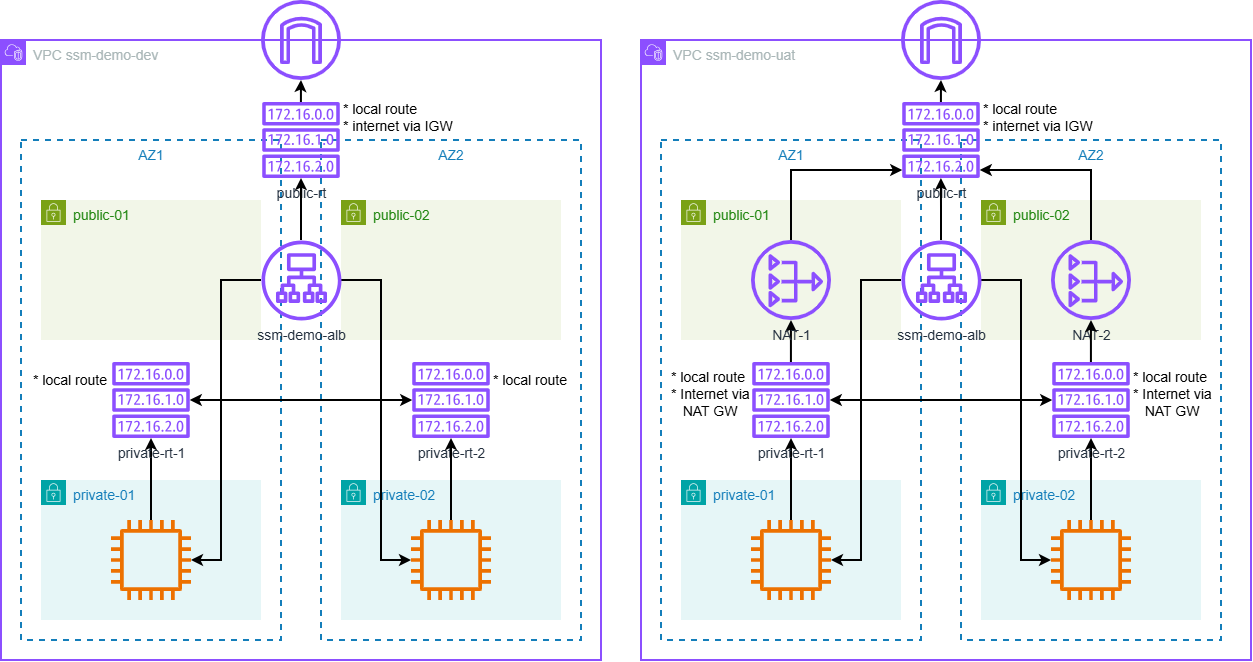
Fig. 1. Dev and UAT environments deployed by Terraform.
AWS System Manager Documents
In addition to the mentioned documents, the solution includes 2 compound documents: Reduce-Environment and Restore-Environment, which execute other documents. So, an engineer may execute these documents instead of executing each individual document. Let’s review them.
Reduce Environment
Runbook Reduce-Environment deletes NAT Gateways and stops running EC2 instances.
Workflow
- Execute Delete-NATGateways runbook, with 2 retries and 10 minutes timeout. On failure, runbook exits.
- Execute Stop-EC2Instances runbook, with 2 retries and 10 minutes timeout.
Number of retries and timeouts could be updated according to your experience.
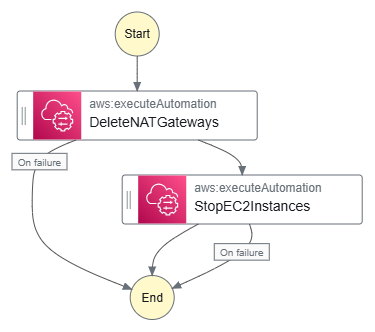
Fig. 2. Reduce-Environment graph.
Parameters
Runbook has the following parameters:
- VpcId (Required) - is a mandatory parameter that identifies the target VPC where resources would be reduced. If you plan to regularly run this runbook for the same VPC, you may set up the default value, and it simplifies runbook execution, either via console or CLI script.
- AutomationAssumeRole (Required) - is a mandatory parameter, which provides the ARN of the role that allows Automation to perform the actions on your behalf. Individual required permissions are listed in the source files, but they could be assigned via AmazonVPCFullAccess and AmazonEC2FullAccess policies. In addition, Terraform code creates a SSMDemoAutomationRole-<<Env>> that has required permissions and could be used to execute runbooks.
Let’s note that Delete-NATGateways and Stop-EC2Instances have the same parameters.
Delete NAT Gateways
Runbook Delete-NATGateways deletes all available NAT Gateways in the given VPC, removes routes in private route tables that use them, and releases Elastic IPs. As the further development of this runbook, it may review NAT Gateways in public subnets only, or remove only those NAT Gateways, which were deployed by Add-NATGateways runbook. To implement this, Add-NATGateways runbook needs to store NAT Gateways identifiers in SSM Parameter Store parameter(s). Then, Delete-NATGateways reads these values and iterates through it.
Workflow
- Search for all NAT Gateways in the given VPC.
- Delete routes in private route tables that direct outbound traffic (0.0.0.0/0) through the NAT Gateway.
- Remove NAT Gateways and wait until all of them are fully deleted.
- Release allocated Elastic IP addresses.
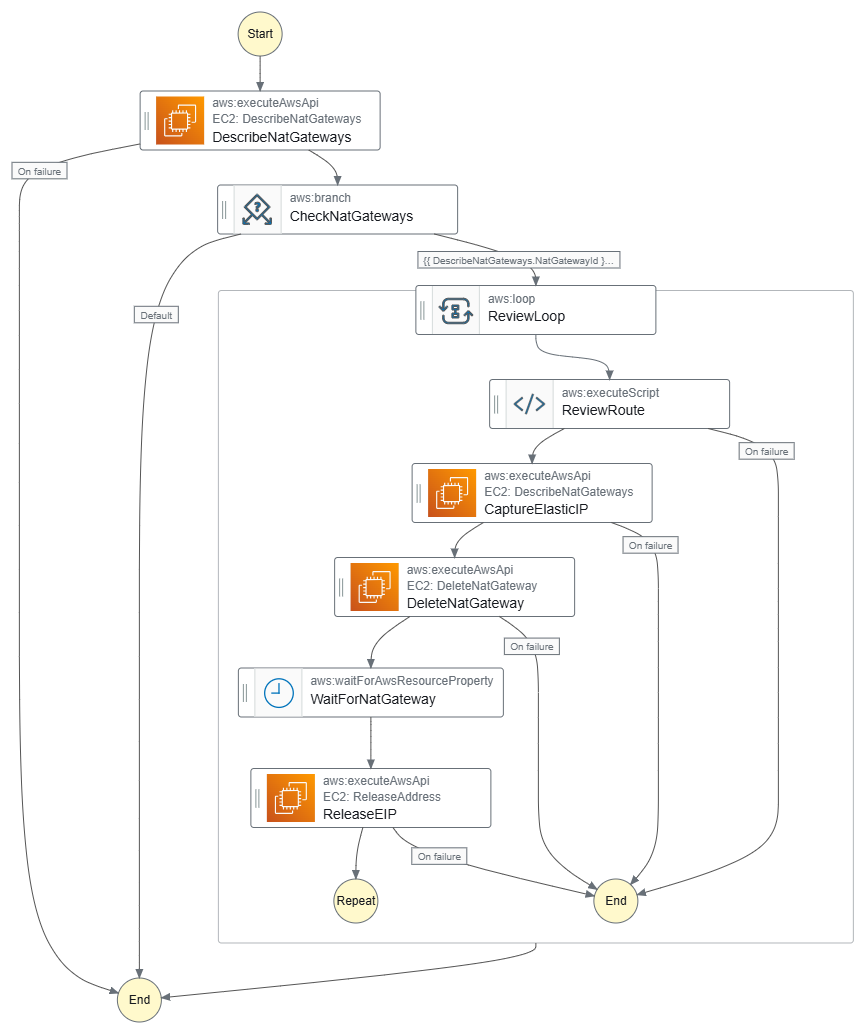
Fig. 3. Delete-NATGateways graph.
Parameters
- VpcId: (Required) Id of the target VPC where to delete resources.
- AutomationAssumeRole: (Required) The ARN of the role that allows Automation to perform the actions on your behalf.
AutomationAssumeRole should have at least the following permissions:
- ec2:DescribeRouteTables
- ec2:DescribeNatGateways
- ec2:DeleteRoute
- ec2:DeleteNatGateway
- ec2:ReleaseAddress
Stop EC2 Instances
Runbook Stop-EC2Instances stops all running EC2 instances in private subnets of the given VPC. To cover more scenarios, it could stop instances based on the name pattern or image ID.
Workflow
- Describe all private subnets in the given VPC.
- Search for and collect running EC2 instance IDs in those subnets.
- If any, stop the instances and wait until they are fully stopped.
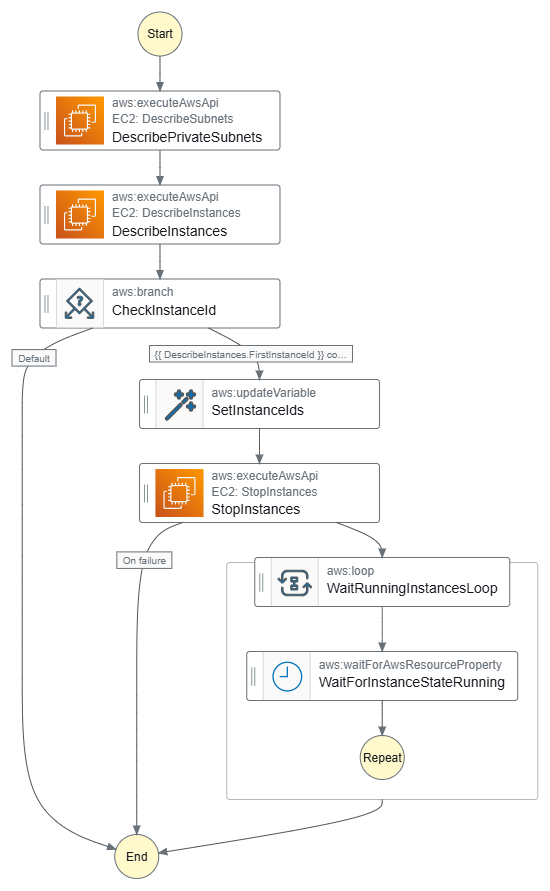
Fig. 4. Stop-EC2Instances graph.
Parameters
- VpcId: (Required) Id of the target VPC where to delete resources.
- AutomationAssumeRole: (Optional) The ARN of the role that allows Automation to perform the actions on your behalf.
AutomationAssumeRole should have at least the following permissions:
- ec2:DescribeSubnets
- ec2:DescribeInstances
- ec2:StopInstances
Restore Environment
Runbook Restore-Environment adds NAT Gateways and starts stopped EC2 instances.
Workflow
- Execute Add-NATGateways runbook, with 2 retries and 15 minutes timeout. On failure, runbook exits.
- Execute Start-EC2Instances runbook, with 2 retries and 10 minutes timeout.
Number of retries and timeouts could be updated according to your experience.
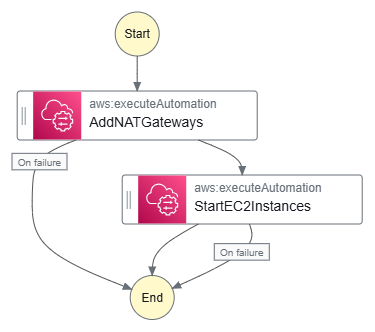
Fig. 5. Restore-Environment graph.
Parameters
Runbook has the following parameters:
- VpcId (Required) - is a mandatory parameter that identifies the target VPC where resources would be updated. If you plan to regularly run this runbook for the same VPC, you may set the default value, that simplifies runbook’s execution - either via console or CLI script.
- ProjectTag (Optional) - is a value for the Project tag (default value - 'blog').
- EnvironmentTag (Optional) - is a value for the Environment tag (default value - 'dev'). ProjectTag and EnvironmentTag are provided to assign tags to the new NAT Gateways. Depending on the application, you may add other required tags and assign default values for them.
- AutomationAssumeRole (Required) - is a mandatory parameter, which provides the ARN of the role that allows Automation to perform the actions on your behalf. Individual required permissions are listed in the source files, but they could be assigned via AmazonVPCFullAccess and AmazonEC2FullAccess policies. In addition, Terraform code creates a SSMDemoAutomationRole-<<Env>> that has required permissions and could be used to execute runbooks.
Let’s note that these parameters are passed to Add-NATGateways and Start-EC2Instances documents.
Add NAT Gateways
Runbook Add-NATGateways looks up for NAT Gateway and creates a NAT Gateway in each public subnet of the specified VPC if it doesn't exist. Then it runs a Python script that updates the private route tables to route internet-bound traffic. Public and private subnets are identified by names - they should include ‘public’ and ‘private’, respectively. In most cases, it is the correct assumption.
Workflow
- Identify all public subnets in the specified VPC.
- For each subnet, check if a NAT Gateway already exists.
- If no NAT Gateway is found, create a new NAT Gateway and assign Elastic IP address.
- Wait until NAT Gateway is fully available.
- Update private route tables to direct outbound traffic through the NAT Gateway in the public subnet in the same AZ.
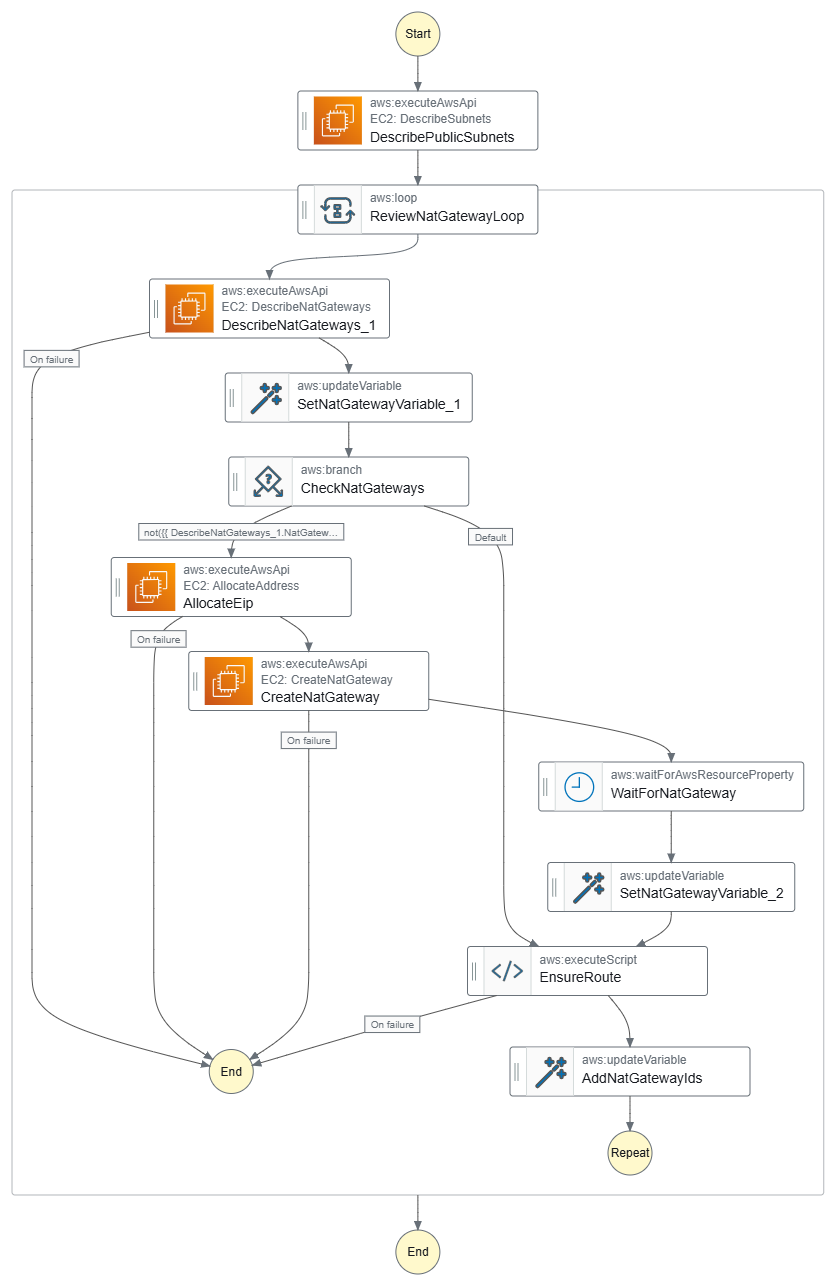
Fig. 6. Add-NATGateways graph.
Parameters
Runbook has the following parameters:
- VpcId: (Required) Id of the target VPC where to delete resources.
- ProjectTag: (Optional) Value for the Project tag (default value - ‘blog’).
- EnvironmentTag: (Optional) Value for the Environment tag (default value - ‘dev’).
- AutomationAssumeRole: (Optional) The ARN of the role that allows Automation to perform the actions on your behalf.
AutomationAssumeRole should have at least the following permissions:
- ec2:DescribeVpcs
- ec2:DescribeSubnets
- ec2:DescribeTags
- ec2:DescribeRouteTables
- ec2:DescribeNatGateways
- ec2:DescribeAddresses
- ec2:AllocateAddress
- ec2:CreateNatGateway
- ec2:CreateRoute
- ec2:ReplaceRout
Start EC2 Instances
Runbook Start-EC2Instances starts all stopped EC2 instances in private subnets in the given VPC. To cover more scenarios, it could start instances based on the name pattern or the image ID. Another improvement is to save the instance ID of stopped instances in parameters, and then start only previously stopped instances. It prevents an unexpected run of stopped instances, not included to Dev or other environments.
Workflow
- Describe all private subnets in the given VPC.
- Search for and collect instance IDs of stopping EC2 instances in those subnets.
- If any, start the instances and wait until they become running and pass all checks.
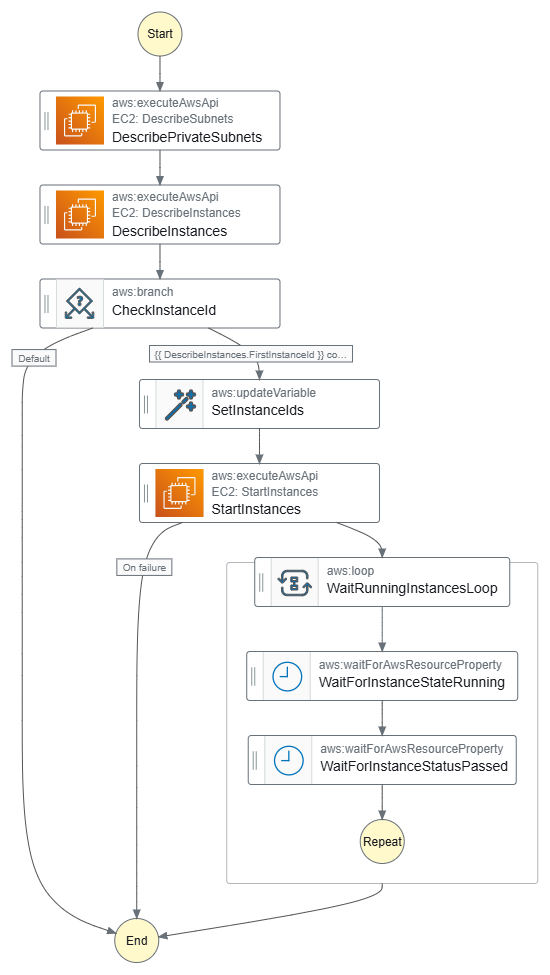
Fig. 7. Start-EC2Instances graph.
Parameters
Runbook has the following parameters:
- VpcId: (Required) Id of the target VPC where to delete resources.
- AutomationAssumeRole: (Optional) The ARN of the role that allows Automation to perform the actions on your behalf.
AutomationAssumeRole should have at least the following permissions:
- ec2:DescribeSubnets
- ec2:DescribeInstances
- ec2:StartInstances
Test execution
Let’s deploy infrastructure and execute runbooks:
- Deploy a Terraform project with local create_nat = true to successfully launch instances;
- Set value back to create_nat = var.environment != "dev" and redeploy environment. As a result, redeploy dev environment by Terraform without NAT Gateways. EC2 instances deployed to the private subnets run web server and home page shows offline status, so it cannot reach Internet;
- Execute Reduce-Environment runbook, NAT Gateways are removed, and EC2 instances are stopped;
- ALB shows “503 Service Temporarily Unavailable”, because there are no running EC2 behind;
- Execute Restore-Environment runbook, and check web server;
- Home page shows online status, connection is restored;
- Repeat execution of Reduce-Environment and Restore-Environment runbooks, if you’d like;
- Destroy all infrastructure.
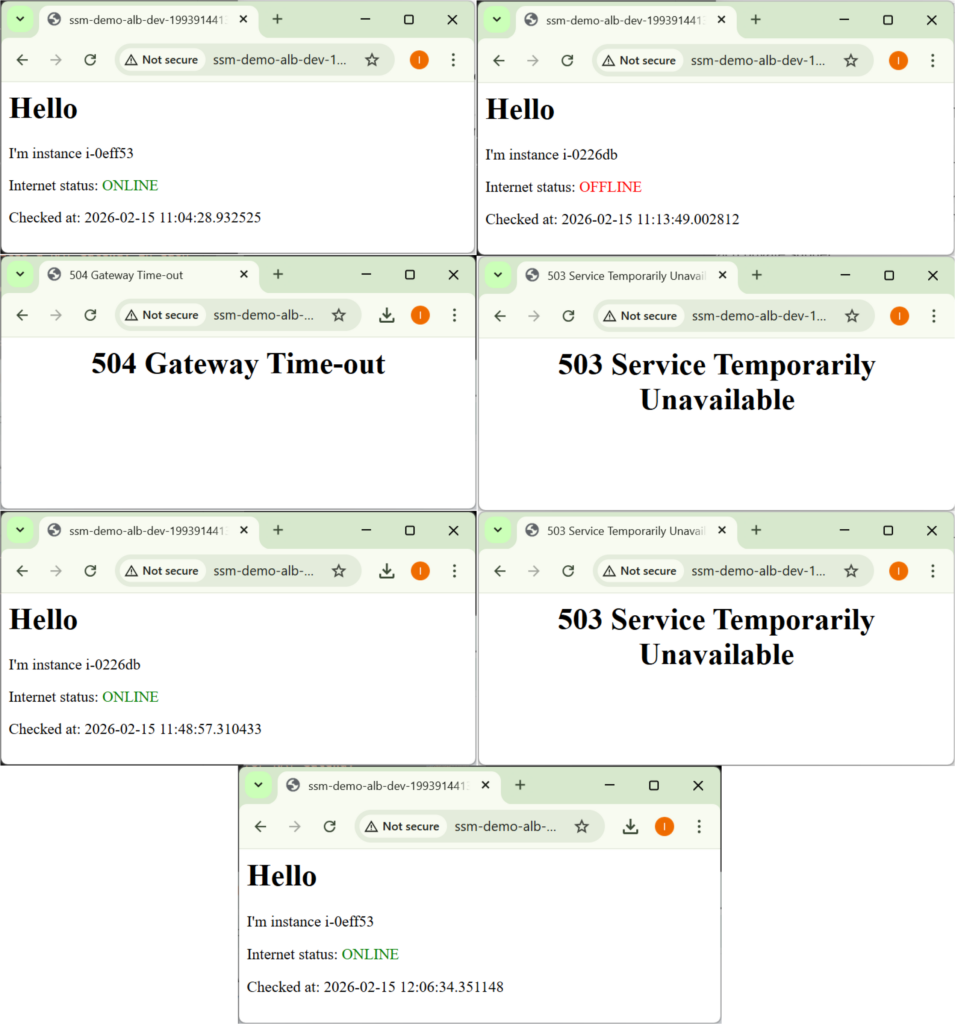
Fig. 8. Tests execution.
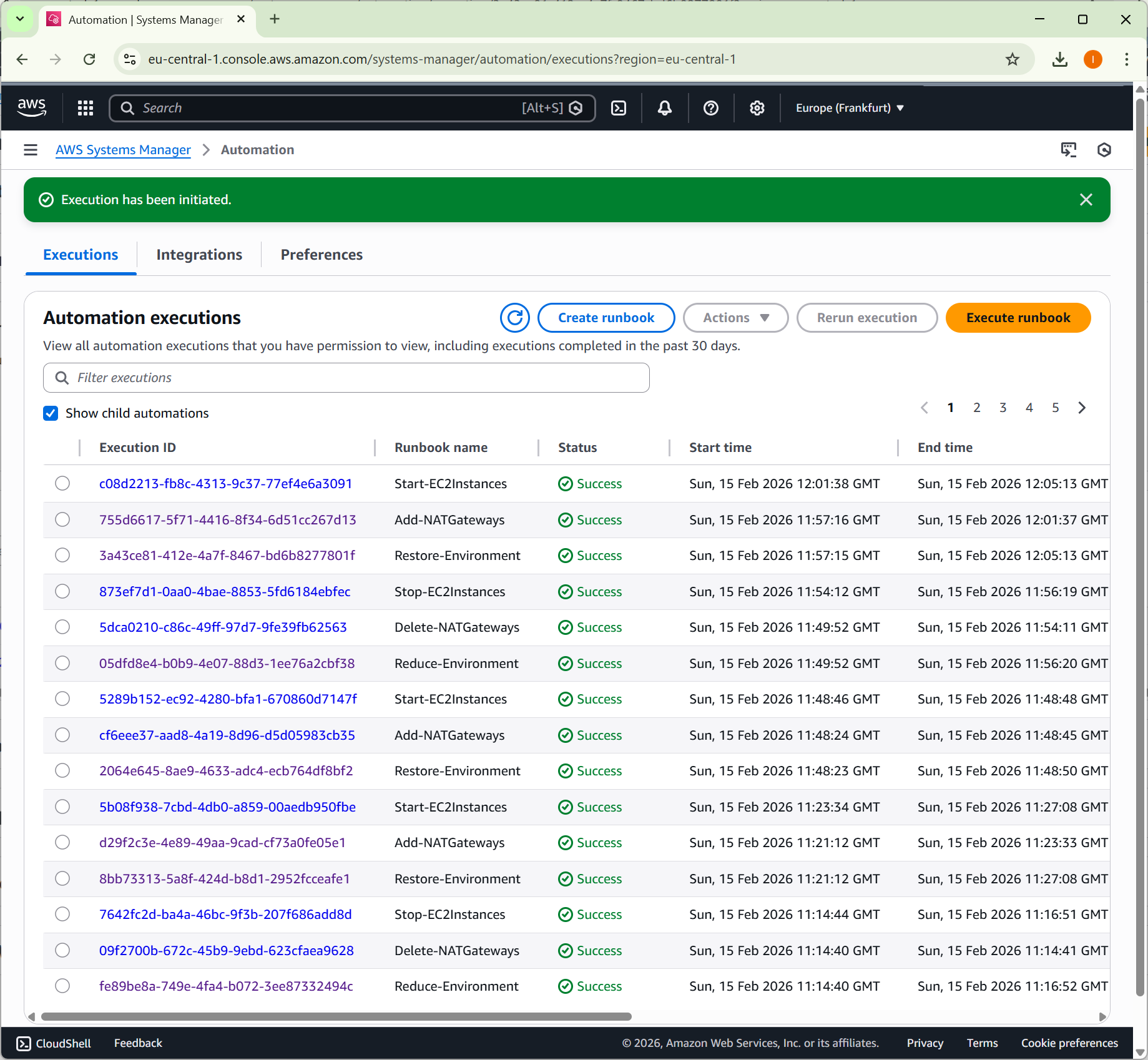
Fig. 9. How to use AWS System Manager to optimize cost of Dev environment.
Summing up
In the post, we discussed how to reduce the operational cost of non-critical environments, considered various approaches, and reviewed their pros and cons. AWS Systems Manager Automation provides a clean and auditable way to manage expensive infrastructure components without breaking IaC workflows.
Instead of rebuilding environments, we can dynamically enable and disable resources while keeping deployments predictable and reproducible. This approach allows teams to reduce costs in non-critical environments without introducing manual scripts or complex CI/CD logic. In practice, automation becomes a controlled extension of infrastructure, not a workaround around it.