Business Intelligence and analytics services are more than trendy concepts; they're in growing demand in an economy that is in dire need of data-driven decisions and solutions. To achieve true and effective business intelligence and analytics, you need numerous information systems for massive data processing. Additionally, you need to change the reference terms for these heavy-duty information systems several times a day, as businesses need to have operational data about specific parameters to quickly respond and adapt to shifting markets and external conditions.
For this purpose, it is common practice to use modern databases, be it relational or NoSQL, to quickly and efficiently build multiple dependencies between large entities. To the rescue, we call upon reliable tools like Python and Pandas. To top it off, it very often happens that certain information is needed immediately and only once, even when dealing with critical business information, key parameters, or market Intel. Tomorrow, that data may no longer be relevant, and you will need to process new data in a new format.
Unfortunately, the development cycle of these types of relational databases can be quite costly and time-consuming. Luckily, you can leverage smart tools to help you alleviate these concerns. By writing a script in Python and pairing it with the Pandas library, you'll be able to solve the problem relatively quickly while yielding accurate results for higher consumption. Let's take a look at how you can process data from various tables in Pandas.
How to load tables in Pandas
The first and most important operation when it comes to data is loading tables. The Pandas library uses a very compact and efficient method of loading tables, where the most common format is CSV.
import pandas as pd

df = pd.read_table('data.csv')

print (df)
Code language: JavaScript (javascript)
Pandas can read SQL data as well:
...
pd.read_sql_table('table_name', 'postgres:///db_name')
...
Code language: JavaScript (javascript)
Why do we need to join data in tables?
Relational databases are designed to join data in tables. Each table in the database contains data of a certain form and content. To get a new representation of information, it is necessary to combine data and obtain tables with different columns and lines. Please refer to the following article for more information about joins in SQL, “Visual Representation of SQL Joins” written by C.L. Moffatt. In it, the author proposed the following visual notation of joins:
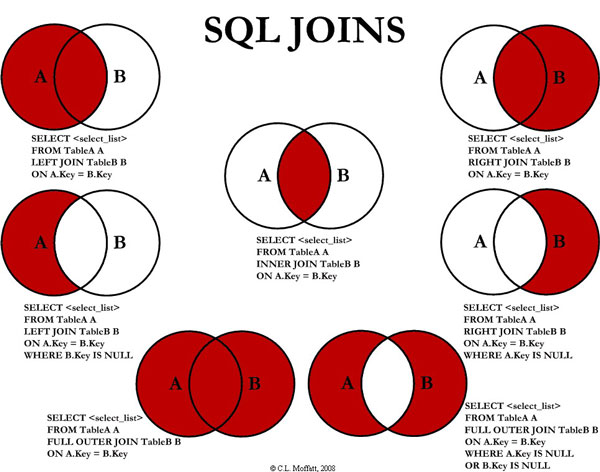
Image from: https://www.codeproject.com/Articles/33052/Visual-Representation-of-SQL-Joins
When combining two tables, they are linked using the chosen characteristic to get a new table or view. Keep in mind that the column used to combine the tables should contain only unique values. Let’s define two tables with some information for the Pandas join experiment.
import pandas as pd

df1 = pd.DataFrame({'lkey': ['Alice', 'Brian', 'Joe', 'Jessica', 'Nick'],
                   'age': [18, 21, 30, 25, 33]})

df2 = pd.DataFrame({'rkey': ['Alice', 'Brian', 'Joe', 'Jessica', 'Zac'],
              'LastName': ['Smith', 'Simson', 'Goodman', 'Hammond', "Bell"]})
Code language: JavaScript (javascript)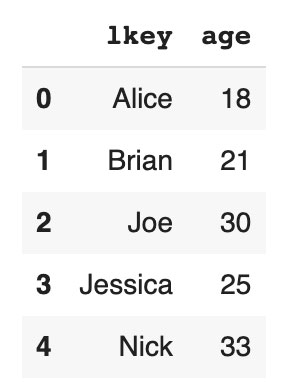
We will make all possible variants of joins in Panda: left, right, inner, outer, and we'll merge two tables. Pandas documentation states that “JOINs can be performed with join() or merge(). By default, join() will join the DataFrames on their indices. Each method has parameters allowing you to specify the type of join to perform (LEFT, RIGHT, INNER, FULL) or the columns to join on (column names or indices).” Please refer to “Comparison with SQL” if you need more information about similarities and differences between SQL and Pandas. Another great article to read is “Pandas vs SQL in 5 Examples”.
Left join
Let’ start with left joining. Join two tables by column lkey in the dataframe df1 and by column rkey in the dataframe df2.
df1.set_index('lkey').join(df2.set_index('rkey'))
Code language: JavaScript (javascript)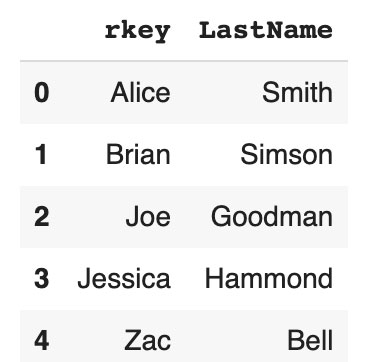
If you do not have a Nick record in the right table, NaN will be marked in the corresponding column after join.
Right join
With the right joining, you can join two tables by column lkey in the dataframe df1 and by column rkey in the dataframe df2 with the right intersection from the table.
df1.set_index('lkey').join(df2.set_index('rkey'), how="right")
Code language: JavaScript (javascript)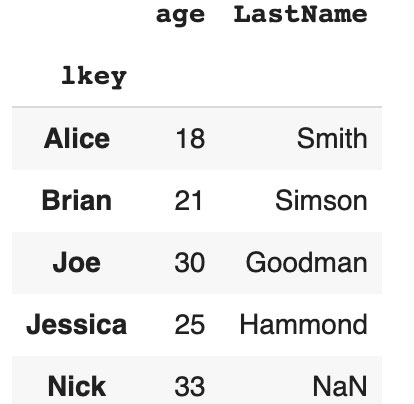
If you do not have a Zac record in the right table, NaN will be marked in the corresponding column after join.
Outer join information systems
Outer joining allows you to join two tables and includes all lines that are present in both tables. NaN will be placed in the proper column if you don’t have such records on the left side or on the right side.
df1.set_index('lkey').join(df2.set_index('rkey'), how="outer")
Code language: JavaScript (javascript)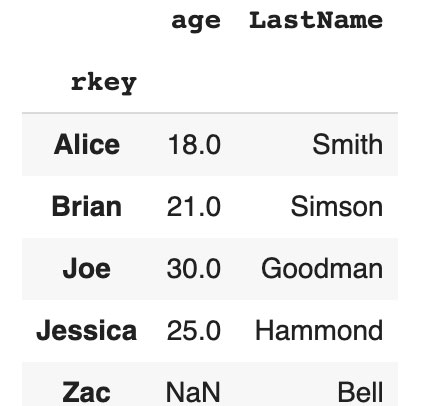
If you do not have a Nick record in the right table, NaN will be marked in the column LastName. If you do not have a Zac record in the left table, NaN will be marked in the column age after joining.
Inner join
Inner join allows you to get all the records from the tables that are present on the left table and right table.
df1.set_index('lkey').join(df2.set_index('rkey'), how="inner")
Code language: JavaScript (javascript)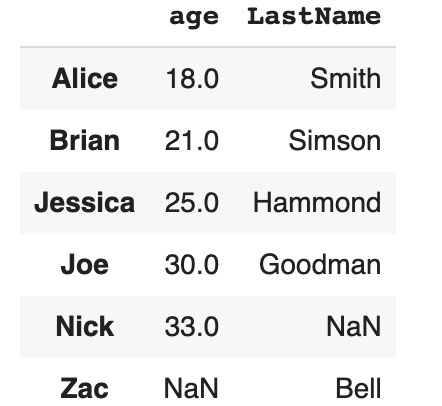
In this case, you won't have lines with Nick and Zac.
Merging data in tables
If you need to keep all columns from the left and right tables, and perform inner joining, Pandas allows you to perform functions like merge:
df1.merge(df2, left_on='lkey', right_on='rkey')
Code language: JavaScript (javascript)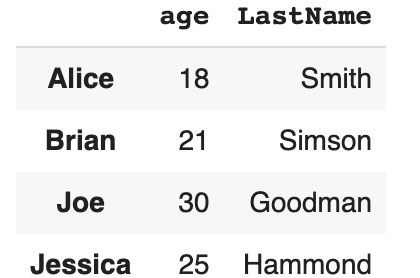
By default, merge uses the inner variant of table union. In this case, you will have Alice, Brian, Joe, Jessica, and lkey, age rkey LastName columns. This is very useful when merging data in tables.
Conclusion
In this article, we aimed to cover the basic techniques to joining tables in Pandas. This is very convenient since you get new dataframes (i.e. tables) as the output. What's more, this information is conveniently processed by all available Pandas algorithms. When it comes to speed, you will be satisfied with how Pandas works with your data volumes. Of course, Pandas will run slower than SQL queries at some point, but when large amounts of data are involved, it is worth switching to noSQL databases for quick information retrieval in the required output you need.
Pandas will be an indispensable tool if you need to quickly and efficiently solve a problem in data science or data analytics. Oftentimes, you need to perform the joining of tables only once, since you will likely need a new set of tasks for your information the next day. It is worth spending time writing and debugging SQL queries when you run this code quite often and on large amounts of data.
Our Python and Pandas experts at Svitla Systems will help you solve data analytics, data science, ETL, and report visualization tasks, to name a few. Experienced project managers, data engineers, data analysts, and software developers will be happy to help you process your data and implement the relevant functions in information systems.

FAQ
Is pandas easier than SQL?
Pandas is “easier” than SQL, mainly when you need quick, one‑off data manipulations or analyses. You can load CSVs or SQL tables directly into DataFrames and use concise Python code like join() or merge() to perform the same left/right/inner/outer joins you know from SQL, while staying in a single Python environment with other analytics tools.
How does Pandas compare to SQL?
Pandas, SQL – both about joining, filtering, and aggregating tabular data. Pandas works inside memory in Python for fast, disposable analysis output from CSVs or databases to DataFrames, followed by join() or merge() (supporting left/right/inner/outer joins) and chained transformations in code. SQL is typically faster and more scalable when the data lives where it belongs – in large, frequently queried relational databases, especially in any production scenario. The truth is that while Pandas leads the charge in ad hoc analytics and sciencey stuff at the keyboard, SQL supports all the classic reporting beyond high-volume variance.
What is the difference between DataFrame and table?
A DataFrame is a slim and smart way to hold data inside the Pandas library, showing information in a table-like view, much like a database table. Where a table usually lives inside a relational database and requires SQL queries for changes, a DataFrame stays in memory as a Python object, enabling quick handling and immediate output. DataFrames are very handy for spur-of-the-moment checks, as they can be quickly created from sources such as CSV files or SQL results to perform complex joins and data science work. In the end, the main difference comes down to where they live: tables are key parts of stored setups, while DataFrames are lively tools for direct data change and logic tasks.
What is an advantage of using data frames instead of tables?
They are flexible and fast for ad-hoc analysis or one-off chores. They live in-memory in Python, so you can easily bring in data from CSVs or a database, perform joins and transforms on the fly using succinct code, and immediately chain results into other analytical algorithms – all without having to write, debug, and maintain SQL code. They are perfect if requirements change with every wind that blows or if you need some specific information processed only once, since you can prototype solutions very quickly without the time lag and cost associated with developing full database schemas.
Should you use pandas for ETL?
Use pandas for ETL when you want to quickly pull data from files or databases and transform it flexibly, in a code-first manner. You can use DataFrames to load, join, clean, and reshape your data with short Python code – very handy for throw-away pipelines, prototyping, and workflows that are biased toward analytics. Since pandas operates in memory, this means moderate volumes of data and tasks that vary, rather than huge production pipelines that are critical to the mission. Big data that requires heavy, repeatable ETL is better handled by purpose-built ETL tools or solutions focused on a database.