


TL;DR: Choosing between a data lakehouse and a data warehouse comes down to which workloads the current warehouse can no longer serve, most often machine learning (ML) and AI on raw data. A lakehouse keeps data in open formats on low-cost cloud storage and adds warehouse-style transactions and governance, so one copy can serve business intelligence (BI), analytics, and AI. The biggest risks in data migration projects are recreating business logic and keeping business users’ trust in their numbers. A phased roadmap with parallel runs and a cutover date for each wave keeps that risk contained.
Key definitions
- Data warehouse: a central repository of structured, modeled data, optimized for SQL (Structured Query Language) analytics and reporting.
- Data lake: low-cost storage for raw structured, semi-structured, and unstructured data.
- Data lakehouse: an architecture that stores data in open formats on low-cost object storage and adds data warehouse capabilities (ACID transactions, versioning, governance, etc.). ACID transactions ensure that concurrent reads and writes are reliable.
- Open table format: a metadata layer (e.g., Apache Iceberg or Delta Lake) that provides table behavior to files stored in object storage (transactions, schema evolution, time travel, etc.)
- ETL (extract, transform, load): pipelines that move data from data sources into a warehouse or lake and reshape it on the way.
- Legacy data warehouse modernization: moving analytics workloads from an older, often on-premises data warehouse (such as Teradata, Oracle, Netezza, or SQL Server) or a Hadoop-based data lake to a cloud platform, with the data, pipelines, and reports moved in stages.
- Data migration process: the planned steps for transferring data, pipelines, and reports from a legacy system to the target systems, from inventory through validation and cutover.
- Parallel run: running the old and new systems simultaneously and comparing outputs before cutover, sometimes called a parallel migration.
- Cutover: the point at which the consumers of a workload switch over to the new platform and the old copy becomes read-only.
The move from a legacy data warehouse, such as Teradata, Oracle, Netezza, or SQL Server, to a data lakehouse often starts with a single request. Maybe your data science team wants raw clickstream data, documents, and sensor readings, but your warehouse was built for clean, modeled tables. Every new source then adds an ETL pipeline and a fresh copy of the data, plus a reconciliation job to keep the copies in sync.
In a 2021 paper, Michael Armbrust and co-authors from Databricks, UC Berkeley, and Stanford described the common two-tier architecture, in which a data lake feeds a data warehouse. They argued that keeping the two tiers consistent was expensive and that warehouse data often lagged behind the data in the lake.
McKinsey’s June 2026 analysis of AI data readiness names data as a key reason only 7% of companies have fully scaled AI across their organizations. Its authors add that traditional data architectures were designed for stable data sets and predictable workflows. For many teams, part of the fix is architectural: a platform that stores raw, unstructured data alongside governed tables, which many legacy warehouses can’t do.
Moving to a lakehouse is therefore a workload decision first and a technology decision second. This guide compares the two architectures and explains when modernization pays off. It also covers the main cloud platform options, a phased migration roadmap, and a readiness checklist. Along the way, it follows the data migration process from the first data audit to cutover, so data migration projects stay tied to business objectives.
What’s the difference: data warehouse vs data lakehouse?
A data warehouse stores modeled, structured data in a managed system optimized for SQL analytics. A data lakehouse keeps data in open data formats on low-cost object storage and adds warehouse-style transactions and governance on top of that storage.
Historically, the data lake came between the two: cheap storage for raw files of any type, with few reliability guarantees. The lakehouse adds those missing guarantees through open table formats such as Delta Lake and Apache Iceberg, usually paired with a catalog for governance.
The table below compares the two architectures across seven dimensions
| Dimension | Data warehouse | Data lakehouse |
| Data types | Mainly structured, modeled tables, with growing support for semi-structured data such as JSON | Structured, semi-structured, and unstructured data |
| Storage | Managed storage, often in a proprietary format | Open file formats such as Parquet, stored on low-cost object storage |
| Main workloads | SQL analytics and BI reporting | BI, near-real-time streaming, data science, and machine learning on shared tables |
| Reliability features | Mature ACID transactions, indexing, and concurrency control | ACID transactions through the table format, though feature maturity varies by engine |
| Cost drivers | Legacy warehouses carry license and hardware costs. Cloud warehouses such as Snowflake and BigQuery bill for compute by usage, separately from storage, so costs follow how much querying the team does. | Storage is cheap, but compute, table maintenance, engine tuning, and training or hiring all add up. Teams also pay for both platforms until the legacy warehouse is retired. |
| Common weak spot | Extra copies and ETL for unstructured and ML data | More design choices, plus governance tooling and engines to select, tune, and run |
| Best fit | Stable reporting on well-modeled data | Mixed BI and AI workloads on growing raw data |
Neither architecture wins in every case. Cloud warehouses have moved closer to lakehouses, too: Snowflake and BigQuery, for example, now support Iceberg tables. The choice is less clear-cut than it was when the lakehouse concept took off in 2021. For more on warehouses, see Svitla’s guide to data warehouse vs database.
What does a data lakehouse architecture look like?
A data lakehouse architecture has three layers: object storage that holds a single copy of the data, an open table format, and a catalog for governance. Query engines sit on top. In the older two-tier setup, data lands in the lake, a pipeline copies a subset into the warehouse, and BI tools read that copy. In a lakehouse, the pipeline writes once, and every engine can read the same tables, with access rules enforced through the catalog.
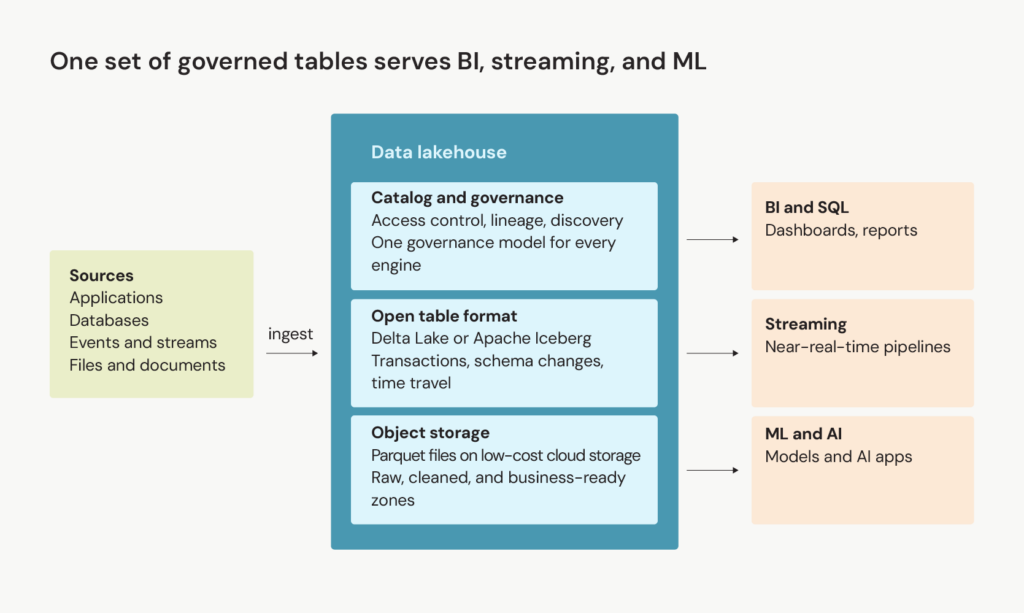
A lakehouse lets BI, streaming, and ML read one set of governed tables.
At the base, object storage such as Amazon S3, Azure Data Lake Storage, or Google Cloud Storage holds the files, usually in Parquet. The table format (usually Delta Lake or Apache Iceberg) turns those files into tables with transactions, schema changes, and time travel. The catalog adds access control, lineage, and discovery. On top of all this, SQL engines, Spark jobs, streaming pipelines, and ML frameworks read the same tables.
Within that storage, many teams organize tables into three zones, known as the medallion architecture: bronze, silver, and gold. Bronze stores raw ingested data, silver contains cleaned and conformed data, and gold serves business-ready data models to BI tools and applications. During a migration, teams use the silver and gold zones to consolidate business logic that was scattered across ETL jobs, stored procedures, and reports.
The layout can limit the damage from schema drift. Bronze keeps source data as received, so an upstream change doesn’t stop ingestion. Schema checks in silver keep a changed column out of the gold tables that dashboards depend on.
Set up the catalog, governance rules, and data ownership at the start of the project. Without them, a lakehouse has better file formats and the same trust issues as the warehouse it replaced. Governance gets harder as engines multiply. Spark, Trino, and BI tools each enforce permissions in their own way, so access rules should live in one central catalog that every engine checks.
One copy of the data doesn’t mean one access pattern. Finance dashboards need predictable response times, while data science notebooks run long scans over raw data. Streaming adds another kind of load: frequent writes create many small files that need regular compaction. For latency-sensitive workloads, many teams add a serving layer on top: caching, materialized views, or a dedicated warehouse engine.
When does legacy data warehouse modernization make sense?
Legacy data warehouse modernization makes sense when the warehouse blocks work the business already needs, such as machine learning on raw data or near-real-time reporting, or when its costs start to steer plans. Four signals point toward it:
- Data science teams copy data into separate stores because the warehouse can’t handle the raw or unstructured data they need.
- Ingestion takes hours or days, so reports trail behind what operations teams already know.
- License costs, hardware refresh cycles, or contract renewals start to dictate the roadmap.
- A lake and a warehouse hold conflicting copies of the same data, and teams argue about which number is right.
Any one of these signals is a reason to inventory the workloads your warehouse blocks, starting with the ones that affect business operations. A lakehouse addresses the first and fourth signals most directly because consolidating data in one place puts raw data next to modeled tables and removes the second copy.
Svitla's data audit, a two- to four-week review of data risks and opportunities, is one way to run that inventory before a company commits to an AI rollout. The results then feed a data modernization strategy, which ties the platform choice to business objectives.
Not every warehouse needs a lakehouse. If your warehouse is stable, well modeled, and mainly supports finance reporting, and your AI plans are modest, a move to a managed cloud warehouse may deliver most of the gains with less effort. This narrower path is usually called cloud data warehouse modernization. Many teams also run a warehouse and a lakehouse side by side during the transition, and some keep the warehouse permanently as the BI serving layer.
A Svitla project for a US healthcare analytics company shows where a warehouse-based design works well. Medical data landed in Amazon S3, AWS Lambda and ETL tools such as AWS Glue prepared it, and Amazon Redshift stored the processed tables behind Tableau dashboards. It’s the classic two-tier pattern, and for this scope it worked well: the team delivered a working application in three months. A lakehouse becomes the stronger option once the scope expands to raw or unstructured data.
Taken together, the four signals and the stay-put cases give you a first-pass decision, shown in the table below.
| What you see in your warehouse | Likely path | First step |
| Raw or unstructured data requests (signal 1) or conflicting copies of the same data (signal 4), alone or with other signals | Lakehouse, migrated in phased waves | Inventory the blocked workloads, then pilot the first one |
| Slow ingestion (signal 2) or renewal pressure (signal 3), with mostly structured data and modest AI plans | Managed cloud warehouse, also called cloud data warehouse modernization | Compare the renewal cost with a cloud warehouse pilot |
| No signal applies and reporting runs reliably | Keep the current warehouse | Revisit at the next renewal or when AI plans and business growth outpace the warehouse |

How do the main cloud platforms compare for data warehouse modernization?
Databricks, Snowflake, Google BigQuery, Microsoft Fabric, and AWS now all support open table formats such as Apache Iceberg to some degree. Because open formats reduce lock-in at the storage layer, the choice now depends more on your existing technology stack, your team’s skills, and your workload mix.
| Databricks | Delta Lake tables and managed Apache Iceberg tables, both governed in Unity Catalog | UniForm lets Iceberg clients read Delta tables without rewriting files, and the Iceberg REST catalog interface lets external engines read and write Iceberg tables in Unity Catalog | Heavy data engineering, ML, and Spark workloads |
| Snowflake | Warehouse engine that also works with Iceberg tables | Bi-directional Iceberg access with Microsoft Fabric, generally available since January 2026 | SQL-centric analytics teams adding open-format storage |
| Google BigQuery | Managed Iceberg tables stored as Parquet in Cloud Storage buckets the customer controls | Open-source and third-party engines such as Spark can work with a single copy | Teams already standardized on Google Cloud |
| Microsoft Fabric | OneLake, which stores tables in Delta Lake format and uses shortcuts to reference data in other clouds without copying it | Metadata virtualization exposes Delta tables to Iceberg readers, and shortcuts let Fabric read Iceberg tables as Delta, with the data files shared | Microsoft-centric organizations built around Power BI |
| AWS | Amazon SageMaker lakehouse architecture, unifying S3 data lakes and Redshift warehouses, with Amazon S3 Tables as managed Apache Iceberg storage | AWS and non-AWS Iceberg-compatible engines query through the AWS Glue Data Catalog Iceberg REST API | Estates with existing S3 and Redshift investments |
Lakehouse architecture diagram showing storage, table format, and catalog layers feeding BI, streaming, and ML
Maturity varies across these features, and vendors label some of them as preview, so current release notes are worth checking before a design depends on them. Use generally available features for production cutovers and save preview integrations for pilots. For the foundation, established paths remain the safer choice: a managed cloud warehouse or a lakehouse built on one platform’s native format.
Next, choose the catalog and governance model before the rest of the platform, because permissions, lineage, and business definitions all depend on it. Table formats are increasingly portable, but those catalog-level assets are not, so platform dependence moves to the catalog. Open catalog interfaces, such as the Iceberg REST catalog API, reduce that lock-in but don’t remove it.
Team skills belong in the same decision. Operating Spark clusters, open table formats, and multi-engine catalogs in a modern data infrastructure takes specialized engineering skills. Training or an outside partner belongs in the budget before the migration starts. A pilot of one representative workload on two shortlisted platforms then turns the choice into numbers: cost per query, tuning and maintenance effort, and migration hours.
How do you build a data warehouse migration strategy?
With a platform shortlisted, the next question is how to move. A data warehouse migration strategy works best when workloads move in waves, ordered by risk, with each wave having its own parallel run and cutover date. The same approach works whether you’re moving an on-premises warehouse to the cloud (a cloud data migration strategy) or replacing a legacy system with a different platform (a legacy system migration strategy).
Each wave is a dependency group: the tables plus the views, ETL jobs, and reports that depend on them. Cutting over one table alone can break its dependent views, so a dependency map of data relationships, built during the inventory, decides what moves together.
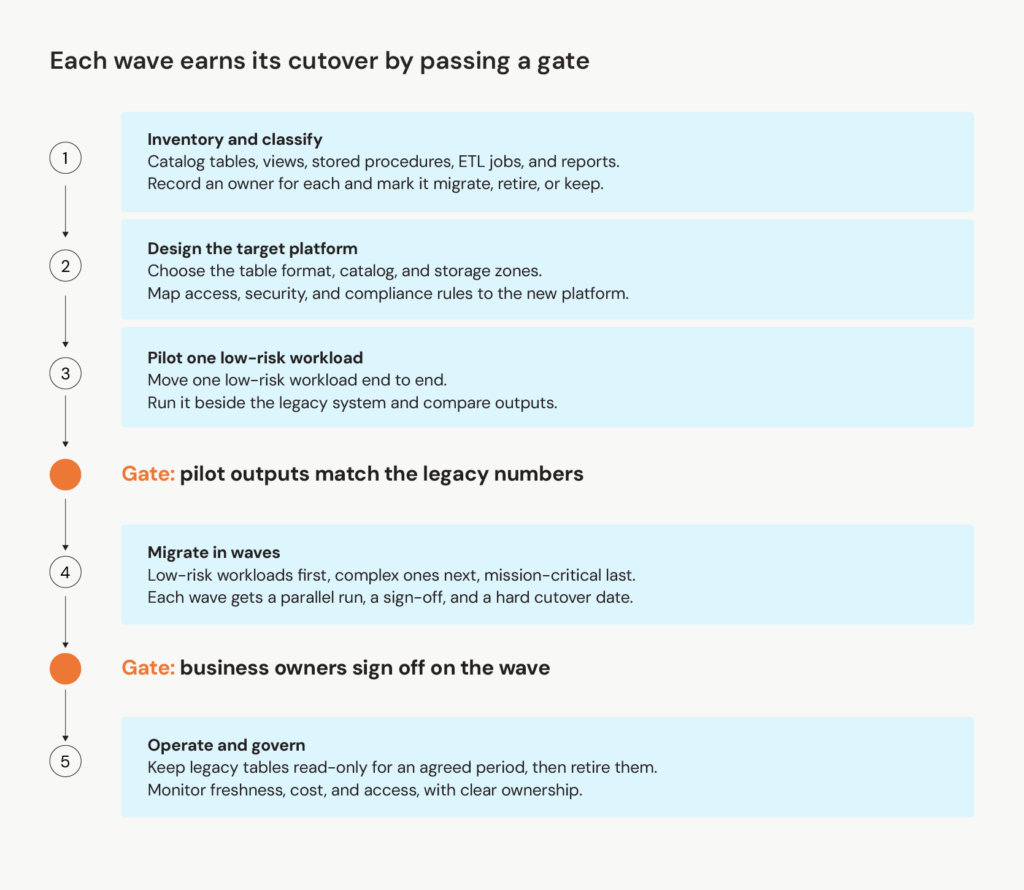
Data migration roadmap diagram showing five phases and two gates
The data migration roadmap has two gates. Pilot outputs must match the legacy numbers before the waves begin, and business owners must sign off on each wave before its cutover.
Pilot a low-risk, self-contained workload to prove the process and the reconciliation. Then move the workload the warehouse blocks as early as its dependencies allow, so the migration delivers value early.
In practice, the data copy is often the easier part. Business logic buried in stored procedures, views, and ETL code takes time. Nobody documented it, the engineers who wrote it have often left, and every dashboard depends on it. Reading the code alone is error-prone, so teams also compare old and new outputs on real data and investigate every mismatch.
Differences in SQL dialects add more work because teams must rewrite warehouse-specific functions for the new engine. Source systems also keep changing during a months-long migration. A new upstream column, or a new ERP system in one business unit, can break a transformation the team already validated.
The second risk is trust. When a migrated report shows a slightly different number, even if it's correct, stakeholders often blame the new platform. Reconciliation reports that explain every difference, signed off by the business owner, give stakeholders the evidence to trust the new numbers. Agreeing on who owns each definition is often harder than producing the reports, because departments define the same metric differently.
Parallel runs also need exit criteria, agreed before they start. A workable rule has two parts: the run covers at least one full business cycle, including a period close, and it ends only after reconciliation passes with no unexplained differences in two consecutive runs. Maintaining data integrity during the overlap depends on that reconciliation, because unexplained differences are often the first sign of missing or corrupted data.
Without exit criteria, both systems keep running. Over time, the legacy warehouse quietly becomes the source of truth again, and the new platform turns into a shadow system the team still has to maintain. The overlap also costs money, because you pay for both platforms until the legacy warehouse is retired. A cutover date for each wave, set at the start, caps that cost.
Svitla's cloud migration roadmap covers the infrastructure side, from landing zones to common cloud migration strategies. A complete plan needs both.
What should a data migration checklist include?
A useful data migration checklist covers the eight areas in the table below. Assign an owner to each area and confirm it passes before a wave moves on.
| Area | What to confirm before the wave moves on |
| Scope and inventory | Every data source, table, view, stored procedure, ETL job, and report is cataloged with an owner, its dependencies, and a migrate, retire, or keep decision that covers which historical data to load and which obsolete data to retire |
| Data profiling is done, data cleansing rules exist for duplicates, nulls, and type mismatches, data quality issues are logged with owners, corrupted data is quarantined, schema changes in source systems are monitored, source owners agree to notify the migration team, and personally identifiable information (PII) is classified | |
| Stored procedures and dialect-specific functions are translated and tested against legacy outputs on real data, each calculated metric has one agreed definition, and a source-to-target mapping records every re-modeled structure | |
| Row counts, checksums, and aggregate totals confirm the migrated data matches the legacy system and ensure data integrity, every difference is traced to a root cause, system functionality is confirmed in the new environment, and exit criteria for the parallel run are agreed up front | |
| Data security controls, including access policies, encryption, PII masking, and audit logging, are defined once in the target catalog, and each query engine that reads the tables is confirmed to enforce them. Sensitive data, including customer data, is classified to protect sensitive information, and data protection and regulatory compliance requirements, including data residency, are documented for the target systems | |
| Representative queries are benchmarked on large datasets at production data volume, including streaming ingestion where it applies, and resource utilization, compute sizing, table maintenance such as file compaction, and budget alerts are set for cost optimization before cutover | |
| Each wave has a cutover date, a tested rollback plan, and a signed-off parallel run, and the legacy copy stays read-only until its agreed retirement date | |
| Monitoring, freshness alerts, runbooks, and ownership are handed to the team that will run the platform, automation tools run the routine checks, and that team is trained on the table format, the engines, and the catalog |
Alongside the checklist, three data migration best practices apply whichever platform is chosen. The first wave is the most self-contained workload, so the process is tested before the business depends on it. Validation is automated, so every wave runs the same comparisons. Business logic is documented as it is translated, so the new platform doesn’t repeat the old one’s blind spots.

Start with the workload your warehouse can't serve
The choice between a data lakehouse and a data warehouse gets easier once it’s tied to a specific request, like the data science team’s request for raw data in the opening example. If the warehouse can serve that request with a few changes, upgrading it is usually the lower-risk path. If it can’t, a lakehouse on open formats gives BI, streaming, and AI one set of governed tables.
Once the decision is made, move in waves. The first wave also shows how long translation and reconciliation take, which helps plan the remaining waves. A successful migration is one where business users keep trusting their numbers on cutover day.
For teams ready to start, Svitla's data engineers support data platform modernization from the first workload inventory through production cutover. A useful first step is to list the three workloads the warehouse handles worst and assign each to a migration wave.
FAQ
What’s the main difference between a data lakehouse and a data warehouse?
The main difference is where the data lives and how many workloads can use one copy of it. A warehouse stores data in its own managed system, which keeps SQL reporting fast and reliable, though other workloads often need an extra copy. A lakehouse keeps data in open formats on object storage, so SQL analysts, streaming jobs, and ML engineers can work from the same governed tables. Both enforce schemas, and modern cloud warehouses also accept semi-structured data, so the difference comes down to storage openness and the range of workloads on one copy.
Why should an enterprise consider modernizing a legacy data warehouse to a lakehouse?
Two signals point most directly to a lakehouse: AI and ML workloads that need raw data, and duplicate lake and warehouse copies that produce conflicting numbers. Slow ingestion or renewal pressure on mostly structured data usually points to a managed cloud warehouse, which already separates storage from compute. Open table formats also make a later platform change easier, because the data stays in files the team controls, although the catalog remains a dependency. The case is weakest for a well-modeled warehouse with a small AI roadmap, or for a team without the skills to run open table formats and several engines.
How do the main cloud platforms compare for lakehouse adoption?
They converge on open table formats but start from different places. Databricks starts with data engineering and ML, Snowflake and BigQuery with the warehouse, Fabric with the Microsoft stack, and AWS with S3 and Redshift. Existing cloud commitments, team skills, and the catalog and governance model usually decide the outcome. Current vendor documentation is the place to confirm feature status, since interoperability features are still maturing.
What are the critical steps in a successful data warehouse migration strategy?
Success starts before any data moves, when business owners agree on metric definitions and approve the migrate, retire, or keep list. After that, the sequence is a pilot on one low-risk workload, migration in waves ordered by risk, and a cutover date per wave. Skipping the approval step pushes the same disagreement into reconciliation, when it costs more to resolve.
What should a data migration checklist include to limit operational risk?
Operational risk hides in the items teams treat as afterthoughts: rollback plans, monitoring, and ownership. A tested rollback path, freshness and quality alerts, and a named owner for each migrated table should be in place before cutover. Afterward, the legacy copy stays read-only until its agreed retirement date.