TL;DR: In July 2026, a bug in AWS Cost Explorer showed thousands of customers billing estimates in the trillions of dollars; in one case, $7.1 trillion. Nothing was charged, but AWS's own cost anomaly alerts were disabled platform-wide during the incident, and several teams reportedly deleted their own infrastructure in a panic over a number that turned out to be false. That's the lesson for cloud FinOps: discipline determines how a team responds to a cost anomaly. The problem FinOps needs to solve is smaller but persistent: Flexera's 2026 State of the Cloud Report found real, billed cloud waste rose to 29% this year, the first increase in five years. AWS offers free native tools for the fix: Cost Explorer, Cost Anomaly Detection, and Cost Allocation Tags, which work if a team commits to using them consistently.
Key terms
- FinOps: the cloud cost management discipline that brings engineering, finance, and business teams together to manage cloud spend as a shared, ongoing practice.
- Inform, Optimize, Operate: the FinOps Foundation's three-phase framework, covering visibility into spend, acting on that visibility, and building the recurring processes that sustain it.
- AWS Cost Anomaly Detection: a free, machine-learning-based AWS service that establishes a spending baseline and alerts on deviations, including root cause analysis.
- Cost allocation tags: labels applied to AWS resources, either user-defined or AWS-generated, that let spend be broken down by team, project, or environment once activated in the Billing console.
What does AWS's $7 trillion billing bug reveal about FinOps discipline?
On the evening of July 16, 2026, AWS customers around the world opened their consoles to impossible numbers. A unit-pricing error in Cost Explorer's estimated billing subsystem inflated forecasts across thousands of accounts; one account with a typical bill under $5 a month showed a $1.7 billion estimate, and another display reportedly read $7.1 trillion in month-to-date charges.
AWS identified the root cause internally (incorrect unit pricing in the estimated billing computation subsystem) within roughly 90 minutes of starting its investigation, though the public Health Dashboard update wasn't posted until closer to three hours later.
The fix didn't hold on the first attempt: an initial rollback failed to resolve the issue, and full recovery wasn't complete for all affected accounts for nearly two days. AWS confirmed throughout that usage and invoices were never affected.
The number was never real. What happened next is the part worth studying. AWS's own cost anomaly alarms detected the spike, but they didn't trigger a response. Instead, it took customer escalations 4.5 hours later to get the company's attention. The company disabled Budget and Cost Anomaly Detection alerts platform-wide while investigating, the exact mechanisms a FinOps practice relies on to catch a real problem. Some teams checked their resource usage data, recognized the estimate as a glitch, and moved on. Other teams got spooked and deleted infrastructure trying to head off a bill that was never coming, which cost them real downtime for nothing. The reaction played out in real time on Reddit and X as the incident unfolded.
That difference - calm versus panic - is what we address in this piece: what FinOps is supposed to build, which AWS tools do the real work, and why the discipline matters, especially when the tools themselves have a bad day.
What is FinOps, and what problem does it solve?
FinOps is the discipline of managing cloud spend as a shared responsibility across engineering, finance, and business teams, rather than a line item that finance reviews after the fact. According to the FinOps Foundation, which is the Linux Foundation project that manages the standard, the practice is divided into three phases: Inform, Optimize, and Operate.
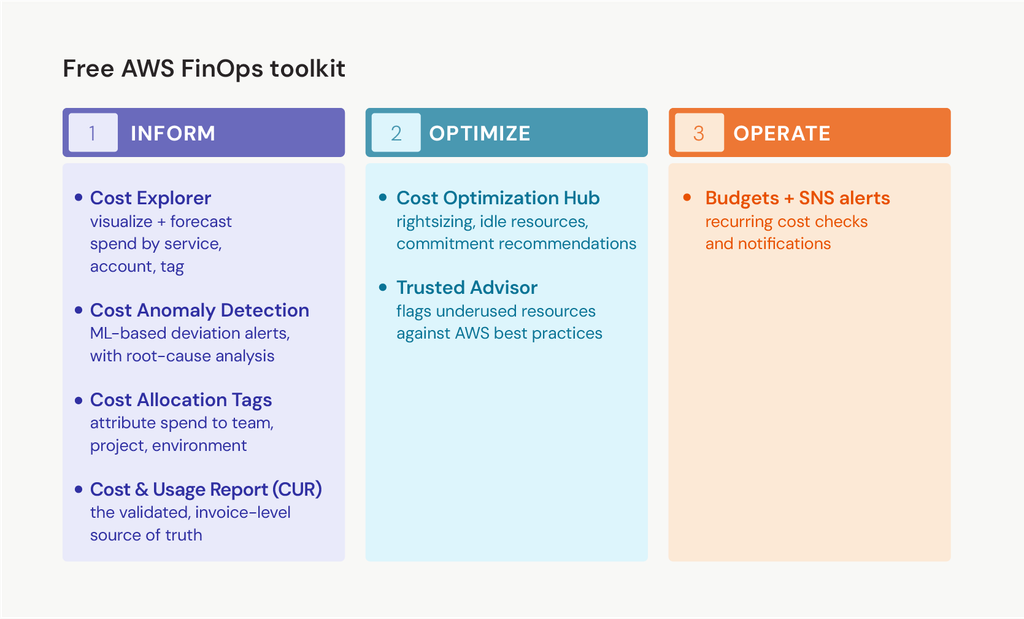
- Inform means establishing visibility: what's being spent, by whom, and on what, through tagging, cost allocation, and forecasting.
- Optimize means acting on that visibility: rightsizing, eliminating idle or unused resources, applying commitment discounts.
- Operate means making both Inform and Optimize repeatable, building the recurring reviews and automated policies that maintain cost discipline between audits.
Teams move through these phases continuously, often at different paces across different business units.
The July 2026 incident is really an Inform-phase story. The teams that stayed calm were the ones who already knew the difference between an estimated feed and a validated invoice, and where to find the real numbers.
Which AWS tools give you cost data visibility?
AWS backs the Inform phase with tools that are free and already available in every account, which means the first step in a FinOps practice usually isn't buying anything. It's worth being specific about what each one is, since the July incident hit one of them.
Cost Explorer visualizes spend across services, accounts, and tags, and generates 18-month forecasts. Those forecasts, not invoices, were the source of the bad estimates in July.
Cost Optimization Hub consolidates savings recommendations, rightsizing, idle resource detection, and commitment opportunities into a single dashboard and recently added an Efficiency Score metric to track progress over time.
Trusted Advisor flags underutilized resources against AWS's own best-practice checks. None of these require a third-party platform to start using, and none of them replace the Cost and Usage Report or invoice as the source of truth for what's really been charged.
How does AWS Cost Anomaly Detection work, and why did it go quiet during the incident?
Cost Anomaly Detection is a free AWS service that uses machine learning to establish a baseline of normal spending and flag deviations, while accounting for seasonality and organic growth, so it doesn't trigger false alarms when usage increases for legitimate reasons.
Setup runs in three steps:
- Create a cost monitor scoped to AWS services, linked accounts, cost allocation tags, or cost categories.
- Set an alert threshold.
- Choose how alerts arrive, individually or as a daily or weekly digest, by email or through Amazon SNS.
Normally, it also provides root-cause analysis, showing which service or account drove the anomaly. During the July incident, reports indicate that AWS disabled these alerts platform-wide as a precaution, presumably to stop every account from being flooded with anomaly alerts over a spike that wasn't real, while the underlying pricing bug was being fixed. That's a useful data point for any team that treats automated alerting as a complete safety net: the alert system is a vendor-built tool with its own failure modes, not a guarantee.
What does AWS cost allocation require?
Cost allocation runs on tags, and AWS splits them into two types.
AWS-generated tags, like createdBy, are automatic and require no setup, which is useful for baseline tracking with zero effort.
User-defined tags, such as Project, Department, or Environment, must be created and activated in the Billing and Cost Management console before they appear in Cost Explorer or a cost allocation report.
The part teams consistently underestimate is that tags only apply going forward. Resources created before the tagging policy was in place remain untagged unless someone updates them manually. As a result, cost allocation tends to work well for whatever gets built after a FinOps practice starts and poorly for the years of infrastructure optimization that came before it. Backfilling that gap is manual, and it's the single most common reason a FinOps rollout stalls in its first quarter.
| Optimization tools | FinOps phase | What the cost management tool does |
| Cost Explorer | Inform | Visualizes and forecasts spend by service, account, and tag |
| Cost Anomaly Detection | Inform | Flags spending deviations using machine learning, with root cause analysis |
| Cost Allocation Tags | Inform | Attributes spend to team, project, or environment |
| Cost and Usage Report (CUR) | Inform | The validated, invoice-level source of truth, separate from Cost Explorer's estimates |
| Cost Optimization Hub | Optimize | Consolidates rightsizing, idle-resource utilization, and commitment recommendations |
| Trusted Advisor | Optimize | Flags underutilized resources against AWS best-practice checks |
| AWS Budgets and SNS alerts | Operate | Automates recurring cost checks and notifications |
What's the real cloud waste problem, if it isn't a $7 trillion bug?
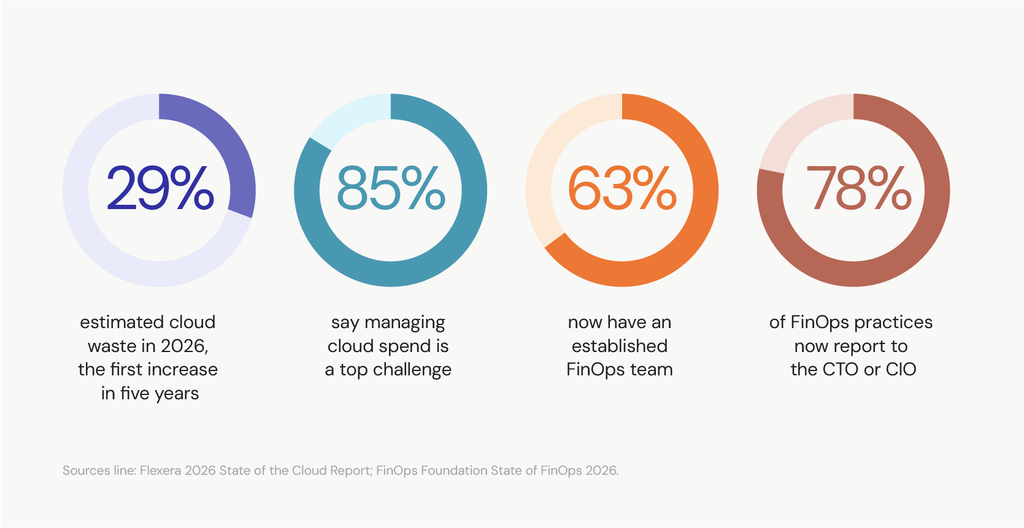
Real, billed cloud waste is smaller than a viral screenshot but far more persistent. Flexera's 2026 State of the Cloud Report found that wasted cloud spend rose to 29%, the first increase in five years, as AI workloads made it harder to track spend and organizations continued to underuse commitment-based discounts such as Reserved Instances and Savings Plans. Managing cloud spend remains the top challenge for 85% of organizations surveyed, even as 63% now report having an established FinOps team.
That's the shortfall FinOps needs to address. A platform bug generates headlines for a day. A slow 29% shows up on every invoice, every month, whether anyone's watching.
How do you build the business case for FinOps to leadership?
FinOps used to be pitched to the CFO as a cost-cutting initiative. The FinOps Foundation's 2026 State of FinOps survey found that 78% of FinOps practices now report to the CTO or CIO, and that practitioners with VP or C-suite sponsorship report roughly 2 to 4 times more influence over technology decisions than those with only director-level sponsorship.
A pitch built on projected savings competes with every other cost-cutting initiative for attention. A pitch built on visibility and response discipline tends to land better with technology leadership because it highlights a resilience gap rather than another usage budget line.
For a specific example, Svitla's fleet-management case study shows how reconfiguring cloud infrastructure and processes cut AWS costs while improving scalability.
How do you get a FinOps practice off the ground?
Start narrow. Trying to instrument everything in month one is how most FinOps rollouts stall. The FinOps Foundation's own maturity model, Crawl, Walk, Run, exists for this reason.
- Activate cost allocation tags before anything else. Tags only apply going forward, so every week without them is spend that will never be attributable later.
- Set up Cost Anomaly Detection on total AWS spend first. A single account-wide monitor catches the biggest risks immediately, before the effort of building granular, per-team monitors.
- Separate detection from automatic destructive action. An alert should reach a person before it triggers a shutdown, cancellation, or resource deletion. The July incident is the clearest possible argument for this: any team with an automated response wired directly to a raw cost alert either fired on phantom data or had no alert to trigger in the first place.
- Run one rightsizing pass using Cost Optimization Hub before buying any commitment discount. Committing to a Reserved Instance or Savings Plan based on inflated, oversized usage locks in the wrong number for a year or more.
- Assign ownership before scaling further. A Cloud Center of Excellence, or even a single accountable owner, keeps tagging and review discipline from decaying once the initial setup enthusiasm fades.
Svitla's DevOps team often ends up owning this operationally, since the Operate phase overlaps heavily with existing deployment and infrastructure automation work.
There will be another billing bug, and what it costs you is still up to you
Both stories, the AWS billing bug and the cloud waste one, share the same lesson: having the tool isn't the same as running the discipline. AWS's own alerting went dark for part of a day in July. Real cloud waste crept back up to 29% in the same year FinOps team adoption grew. Having a FinOps team isn't the same as running the Inform, Optimize, and Operate cycle consistently, and AWS's own tools only work if someone owns turning them on, keeping them on, and knowing where to look when they go quiet.
Svitla works with engineering teams to build the tagging, monitoring, and review structure a FinOps practice depends on. Getting the tools running is the smaller half of the work.
FAQ
What caused AWS's $7 trillion billing data error in 2026?
A unit-pricing bug in AWS Cost Explorer's estimated billing computation subsystem, active for roughly a day in mid-July 2026, calculated cost forecasts using an incorrect unit price, in some documented cases inflating estimates into the trillions of dollars. AWS confirmed the error was limited to the forecast display and did not affect actual usage tracking, billing, or customer charges.
What is cloud FinOps?
Cloud FinOps is the practice of managing cloud spend as a shared discipline across engineering, finance, and business teams, rather than a cost finance review in isolation after the bill arrives. It's maintained as an open framework by the FinOps Foundation, a Linux Foundation project.
How do you control or reduce AWS costs with FinOps?
The three levers that do the most work are the ones already free in every AWS account: rightsizing overprovisioned instances, activating cost allocation tags so spend is attributable, and setting up Cost Anomaly Detection so a spike gets caught early. None of them require new tooling or budget to start, which is why FinOps treats cost control as an operating habit rather than a one-time cleanup project.
What are the FinOps Foundation's core principles?
The FinOps Foundation defines six principles: teams collaborate on cloud costs, decisions are driven by business value, everyone owns their cloud usage, cost and usage data is accessible, a centralized team enables best practices, and organizations take advantage of the cloud's variable cost model. The Foundation updated four of the six in 2025, its first revision since 2019, to reflect FinOps's expansion beyond the public cloud alone.
What should you look for in FinOps tools or a consulting partner?
Start with what AWS already includes for free: Cost Explorer, Cost Anomaly Detection, Cost Optimization Hub, before evaluating anything paid. A third-party tool or consulting partner earns its cost when it solves a problem native tools can't: cross-account or multi-cloud environment attribution, automated commitment management, or embedding FinOps practices into an organization that lacks the internal bandwidth to build them on its own.
How long does it take to see ROI from FinOps?
Visibility gains, knowing where spend goes, tend to show up within weeks of activating cost allocation tags and Cost Anomaly Detection. Measurable savings take longer, since rightsizing and commitment discounts need real usage data to act on safely, usually a full billing cycle or more. Treating FinOps as a 90-day savings project rather than an ongoing practice is the most common reason the early ROI doesn't hold.
Does FinOps only apply to AWS?
No. The FinOps Foundation's framework is provider-agnostic and increasingly covers SaaS, private cloud, and AI spend alongside public cloud. Svitla's cloud development team also works across Azure and Google Cloud, applying FinOps practices for teams operating across multiple cloud providers.